TL;DR
The deck version of your proposal answers the questions you predicted. The interactive version answers the ones the client actually has: what happens at a smaller scope, with their traffic numbers, without phase two. AI made building that version a prompt instead of a dev project, and it lands differently: a page with their name on the URL, toggles they can drag in the buying meeting, and your positioning intact on every path. The deck becomes the leave-behind, not the pitch.
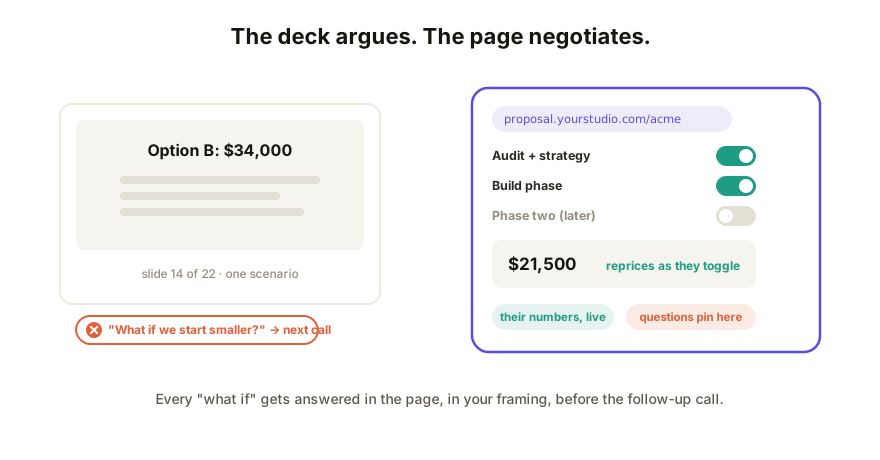
Why interactive wins the proposal, specifically
Proposals are a special document: the reader's first move is negotiation. "What if we start smaller?" "What does just the audit cost?" "Can we see it with our numbers?" A deck meets every such question with silence until the follow-up call; slide 14 covers one scenario and the appendix covers two more, badly.
An interactive proposal absorbs the negotiation instead:
- Scope toggles. Options on, options off; the price and timeline recalculate live. The client explores the space themselves, in your framing, with your floors built in.
- Their inputs. A field for their volume, team size, or current spend, and the ROI section computes with their numbers, which is infinitely more persuasive than your example client's.
- One page, every stakeholder. The champion forwards a link, not a 14MB attachment; the CFO drags the price slider; the technical reviewer expands the details section. Each reads their own proposal (the same property that fixes reports).
- Questions land on the page. "Does this include migration?" arrives pinned to the scope card it's about, not in a Tuesday email you reconcile by hand.
Building it: a prompt, not a project
This is the artifact shift applied to sales. Give your AI tool the proposal contents (scope, tiers, pricing logic, the ROI math) and ask for an interactive proposal page: sections, toggles, a calculator, your palette. Iterate until the numbers behave; ask for one self-contained HTML file. Total cost: an afternoon, most of it on the words, which you already owned.
Two build tips that matter for proposals in particular: keep the pricing logic simple enough to verify by hand (you'll be quoting these numbers), and give every toggle a sane default so the first impression is your recommended package.
Sending it: where proposals live or die
A proposal is the last artifact you want arriving as a file or sitting on an AI vendor's domain. The delivery checklist:
- One live link, no account required of the client. Their procurement team will not sign up for anything to read a proposal.
- Your domain on it.
proposal.yourstudio.com/acmereads as a deliverable; a vendor URL reads as a demo. White-label if the tooling should disappear entirely. - Access control. Proposals carry pricing; invite-only beats public-if-guessed.
- Update in place. Scope changed after the call? Republish; the same link shows the revision, and history keeps what they saw before, which is exactly the record you want when terms move.
- Let them respond on it. Comments on the page collapse the feedback loop that email was.
And yes, still attach a PDF snapshot at signature time; the frozen copy is for the file, the live page is for the decision.
How Coedit fits
Coedit is the sending half: paste the proposal HTML from whatever AI built it and share one live link where the client views, toggles, and comments with zero accounts. Pro puts it on your domain with invite-only access and white-label, and every revision lands in version history so "which version did they approve?" always has an answer. Coedit doesn't write the proposal or the pricing; it makes the page you built arrive like the deliverable it is.
FAQ
Q: What makes a proposal interactive? A: Elements the client can operate: scope toggles that reprice live, input fields that compute ROI with their numbers, expandable detail sections. The reader negotiates with the page instead of waiting for the follow-up call.
Q: Do clients actually engage with interactive proposals? A: The forwarding behavior is the tell: a link travels to stakeholders an attachment never reaches, and each one can answer their own first question in it. You'll hear it in the follow-up call: they arrive having already explored the options.
Q: How do I keep proposal pricing confidential on a link? A: Don't use a bare public URL. Share invite-only so the link opens for the people you named, keep viewing account-free so there's no signup wall, and put it on your domain so it's clearly yours.
Q: What about the signed record? A: Freeze a PDF snapshot at agreement time for the file. The live page carries the deal to the decision; the frozen copy commemorates it. Version history bridges the two by recording exactly what was shown when.