TL;DR
An AI tool's share link lives on the AI tool's domain, and for anything client-facing, the URL is part of the deliverable. Two real routes to tools.yourname.com: self-host the exported HTML on a static host and connect your domain there (full control, manual updates), or publish through a sharing tool that supports custom domains (one DNS record, updates and collaboration handled). Either way, the DNS step is smaller than its reputation.
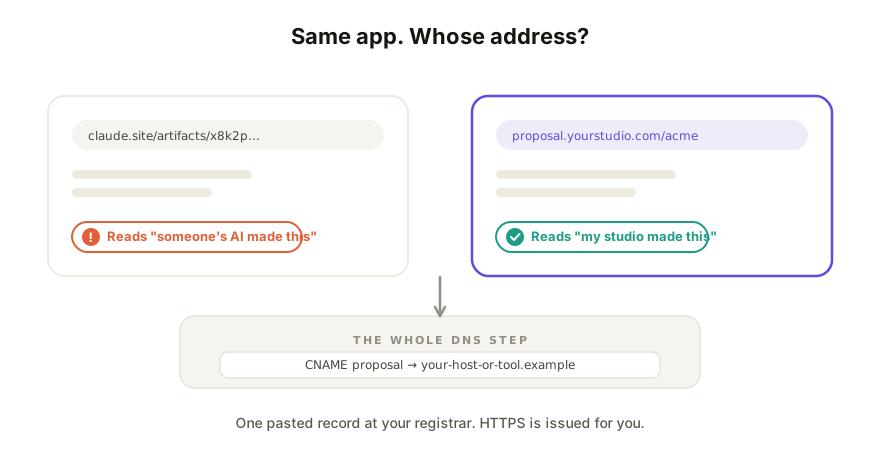
Why the URL matters
Nobody prints a URL on a slide deck, but everyone reads the one in their address bar. claude.site/artifacts/a1b2... says "someone's AI made this." proposal.yourstudio.com says "my studio made this." For internal scratch work, that difference is worth nothing; for a client proposal, a published tool, or anything carrying your brand, it's the difference between a deliverable and a demo. (It's limit #2 of the built-in share links, and no vendor link clears it.)
One prerequisite for both routes: you own a domain. If not, buy one at any registrar first (roughly $10-20/year); everything below assumes you have it.
Route 1: self-host, connect the domain yourself
The classic path, and entirely doable without being a developer:
- Export the app's HTML from your AI tool, self-contained (what that means and why it matters).
- Put it on a static host: Netlify, Vercel, Cloudflare Pages, GitHub Pages. Drag-and-drop is enough on the first two.
- Add your domain in the host's dashboard. It will tell you exactly which DNS record to create.
- Create that record at your registrar. Typically a CNAME: a line in your domain's settings saying "
tools.yourname.compoints at the host." Copy, paste, save. - Wait for it to take effect (minutes to a few hours) and for HTTPS to be issued automatically. Done: your app, your URL, free tier almost certainly sufficient.
The honest costs: every content change is a manual re-export and re-upload; the page is public with no access control unless you add tooling; and there's no feedback, editing, or history: you've built distribution, not collaboration. Perfect for finished, public, set-and-forget pages.
Route 2: a sharing tool with custom-domain support
If the app is a living thing (clients commenting, teammates editing, versions accumulating), connect your domain to the collaboration surface instead:
- Publish the app there and confirm the shared link works.
- Add your subdomain in the tool's settings; it gives you one DNS record to create, same move as above.
- Your live, collaborative link now answers at
share.yourname.com: same commenting, editing, and history, your address on the door.
The honest costs: custom domains are typically a paid-plan feature, and you're trusting the tool's hosting rather than running your own. In exchange, updates are republish-in-place (no re-uploading), and the URL survives every iteration because the link was live to begin with.
Which route, when
| Your situation | Route |
|---|---|
| Finished, public, rarely changes | Self-host |
| You want infrastructure control | Self-host |
| Clients or teammates interact with it | Sharing tool with custom domain |
| It updates weekly | Sharing tool (republish beats re-upload) |
| White-label matters (no vendor badge at all) | Tool with white-label + custom domain |
The pattern from the sharing ladder holds: choose by what the people at the other end need to do. The domain is about how it looks arriving; the route is about what happens after they arrive.
How Coedit fits
Coedit's paid plans do route 2: connect a subdomain with one CNAME record and your shared apps serve from your URL, with the collaboration intact: no-account viewing and commenting, no-code edits, invite-only links if the work is private, and version history behind every republish. A per-project white-label toggle removes Coedit's own branding from the page for fully-yours client work. The app itself still comes from wherever you build (Claude, ChatGPT, Gemini, Lovable, v0); Coedit is the address and everything that happens at it.
FAQ
Q: Can I put a Claude artifact or ChatGPT canvas on my own domain? A: Not via their built-in share links, which live on the vendors' domains. Export the HTML, then either self-host it with your domain connected, or publish through a sharing tool that supports custom domains.
Q: Do I need to know DNS to do this? A: You need to paste one record. Whichever host or tool you use tells you the exact name and value; you copy them into your registrar's DNS page and save. HTTPS certificates are issued automatically on every mainstream option.
Q: Subdomain or root domain for the app?
A: Subdomain (tools., share., app.), almost always. It leaves your root site untouched, keeps DNS to one clean record, and lets you host different tools on different subdomains later.
Q: Does a custom domain cost extra? A: The domain itself is an annual registrar fee. Static hosts connect it free on their standard tiers; collaboration tools typically gate custom domains behind a paid plan, which is also where features like invite-only sharing tend to live.