TL;DR
That .html file is the actual thing Claude built: a small web page. To see it, double-click the file and it opens in your browser. You didn't break anything; this is just how a web page is stored. The part that trips people up isn't opening it, it's sharing it, because the file only works properly on the computer it's sitting on. More on that below.
What the file actually is
An HTML file is a web page in a single file. Same kind of thing every website is made of. Your browser just usually downloads it from the internet instead of finding it on your desktop.
When you ask Claude to build a page, a tool, a planner, a calculator, anything you can click on rather than just read, it writes that as HTML and hands you the file. The name usually ends in .html, and depending on your computer the icon might be your browser's logo, or a blank page, or the Claude/Anthropic icon. All of those are fine. It's the same file.
You don't need any special software. If you have a web browser (Chrome, Safari, Edge, Firefox), you can already open it.
How to open it
- Find the file. It's usually in your Downloads folder if you saved it from Claude. On a Mac, look in Finder; on Windows, in File Explorer.
- Double-click it. It should open in your default browser as a normal-looking web page.
- If double-clicking doesn't work, right-click the file → Open with → pick your browser. That's it.
What you'll see is exactly what Claude showed you in the chat, now running on its own. You can click buttons, type in fields, scroll. It's live, not a screenshot.
On a phone it's clunkier. HTML files are built to open on a computer, and phones don't handle loose files well. If you're on a phone, the sharing approach below will save you the headache.
The part nobody warns you about: sharing it
Here's where people hit a wall, and it's worth understanding why so it doesn't feel like you did something wrong.
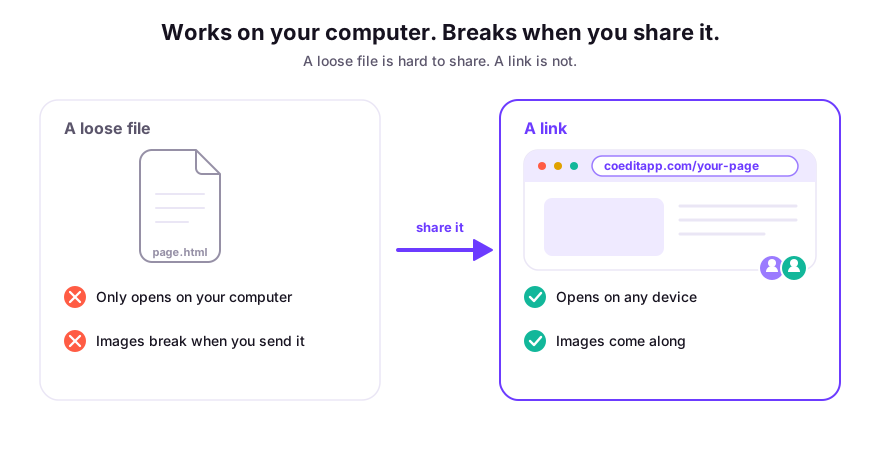
The file works on your computer because it's sitting right there. The moment you try to send it to someone else, three things tend to go wrong:
- You email the file and it gets stripped or flagged. A lot of email systems block or quarantine
.htmlattachments, because the format can be used for phishing. So your perfectly innocent planner never arrives, or lands in spam. - The images disappear. If Claude's page used images, they're often stored next to the file on your machine, not inside it. Send just the
.htmland the other person sees broken image icons. - The other person has to download and open a file, which already feels sketchy to most people, and doesn't work at all on their phone.
None of this means the file is broken. It means a loose file is the wrong way to share a web page. Websites live at a link for exactly this reason.
Your options, fastest to best
Just want them to look once? Take a screenshot. It's lossy (they can't click anything), but it sends anywhere instantly. Fine for "what do you think of this?"
Need them to actually use it? Put it online so it has a link. Traditionally that meant a hosting service and a bit of technical setup. That's overkill for a single page from Claude, and it still leaves you with no way to get comments or let anyone edit.
Want them to use it and give feedback or make changes? This is where a loose HTML file really runs out of road, and it's the gap we built Coedit to fill.
How Coedit fits
Coedit takes the HTML file Claude gave you and turns it into a real link: paste the HTML in, or upload the file, and you get a page anyone can open in a browser or on their phone, no account needed and no download. Images come along for the ride, so nothing shows up broken.
From there you get the things a loose file can't do: people can comment directly on a part of the page, non-coders can change the wording or colours without going back to Claude, and every version is saved so you can roll back. Coedit doesn't build the page (Claude already did that); it's what you use once the page exists and you want other people involved.
The same approach works whether the file came from Claude, ChatGPT's canvas, Gemini, or anywhere else. It's just HTML underneath.
FAQ
Q: Did I do something wrong? Why did Claude give me a file instead of a webpage? A: Nothing wrong. A web page is a file. Claude just gives you the file directly. Opening it in your browser turns it back into the page you saw in the chat.
Q: Why won't the file open on my phone? A: Phones don't handle loose HTML files well; they're meant for computers. Putting the page online at a link is the reliable way to open it on a phone.
Q: I sent it and the images are broken. What happened? A: The images were saved next to the file, not inside it, so they didn't travel with the attachment. Hosting the page at a link (or pasting it into Coedit, which stores the images for you) fixes this.
Q: Is it safe to open an HTML file from Claude?
A: A page you generated yourself is fine to open. General caution: don't open random .html files emailed to you by strangers, since the format can be misused, but your own Claude output is exactly what you think it is.