TL;DR
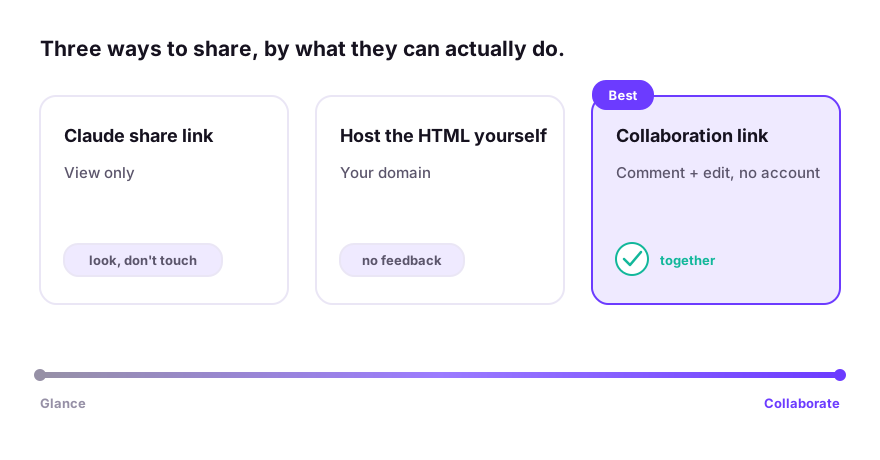
You've got three real options. Use Claude's built-in share link if the other person just needs to look and you don't mind Claude's limits. Export the HTML and host it yourself if you want it on your own domain and don't need feedback. Use a collaboration link (like Coedit) if you want people to comment, edit, or work on it with you. Pick by what the other person needs to do, not just see.
First, what "the app" actually is
When Claude builds you something interactive, it's an artifact: under the hood, an HTML page. That matters because how you share it depends on whether you're sharing inside Claude or sharing the page with the wider world. The three options below are really those two paths plus a middle one.
Option 1: Claude's built-in share link
Claude can give you a link to an artifact directly.
- Open the artifact in Claude.
- Look for the Share or publish option on the artifact.
- Create the link and send it.
When this is the right call: you want the fastest possible "here, look at this," and the recipient only needs to view it.
The limits, honestly: shared Claude artifacts are view-only for the other person, the link lives on Claude's domain rather than yours, and there's no way for the viewer to leave a comment on a specific part or change anything. If they want a tweak, it comes back to you as a message, and you go re-prompt Claude. Fine for a quick look; frustrating the moment more than one person is involved.
Option 2: Export the HTML and host it yourself
If you want the page on your own domain and under your control, you can take the HTML out of Claude and put it online.
- Download or copy the artifact's HTML.
- Put it on a static host (Netlify, Cloudflare Pages, GitHub Pages, and similar).
- Share the resulting link.
When this is the right call: you're comfortable with a little setup, you want your own URL, and the page just needs to be seen: a portfolio piece, a one-off landing page.
The limits: it's more steps than most people want for a single page, you'll need to re-upload by hand every time Claude changes something, and, same as option 1, there's still no commenting, no editing by anyone else, and no version history. You've moved the file; you haven't made it collaborative.
Option 3: A collaboration link
If the reason you're sharing is to get feedback or to let someone help, sharing a frozen copy doesn't cut it. This is the gap the first two options leave open.
A collaboration tool takes the same Claude HTML and turns it into a link where people can actually do things: open it with no account, comment on a specific element, edit the copy or design without touching code, and roll back through a saved history. That's the category Coedit is in.
- Paste the artifact's HTML into Coedit, or push it straight from your tool.
- Share the link, on your own domain if you're on a paid plan.
- Whoever opens it can view, comment, and (if you allow it) edit. No seat in Claude required.
When this is the right call: anyone else needs to weigh in or make changes: a client, a teammate, a friend whose opinion you want. Which, honestly, is most of the time you're sharing something in the first place.
So which one?
A quick way to decide:
| What the other person needs to do | Best option |
|---|---|
| Just glance at it once | Claude share link (or a screenshot) |
| View it, on your own domain, no feedback needed | Host the HTML yourself |
| Comment on it, edit it, or build on it with you | A collaboration link like Coedit |
The mistake is defaulting to option 1 for everything, then doing feedback by hand in a chat thread. If you find yourself relaying "they said make the button bigger" back to Claude, you wanted option 3.
How Coedit fits
Coedit is built for that third case specifically. It doesn't generate anything (Claude already made your app), it's the layer you add once the app exists and other people need in. Paste the HTML, share the link, and viewers and commenters are free and account-free. Comments attach to the exact element they're about, non-coders can change wording and styling directly, agents can push updates through the CLI or an MCP tool, and every change (human or agent) lands in one version history you can roll back. It works the same with apps from ChatGPT, Gemini, v0, Lovable, or hand-written HTML. Claude is just where a lot of people start.
FAQ
Q: Can someone edit a Claude app I shared with them? A: Not through Claude's own share link. That's view-only, and edits route back through you. To let someone edit directly, put the app on a tool built for collaboration, where non-coders can change copy and design without re-prompting.
Q: Can I share a Claude app without giving the other person a Claude account? A: Yes. Both self-hosting the HTML and using a collaboration link let anyone open it with no Claude account. With Coedit, viewing and commenting need no account at all.
Q: Can I put a Claude-built app on my own domain? A: Yes. Either host the exported HTML yourself, or use a tool that supports custom domains so the share link is on your URL instead of the AI tool's.
Q: How do people leave feedback on it? A: A plain share link or hosted page has no feedback built in, so you'll get comments in chat or email. A collaboration layer lets people comment on the specific part of the page they mean, which is far less to untangle.