TL;DR
There are five real ways to share an app an AI built for you: a screenshot, the file itself, the AI tool's built-in share link, hosting it yourself, and a collaboration link. The best one depends on a single question: what does the other person need to do with it? For a glance, the built-in link is fine. The moment anyone needs to respond (comment, edit, approve), a collaboration link wins, because it's the only option where feedback lands on the work instead of around it.
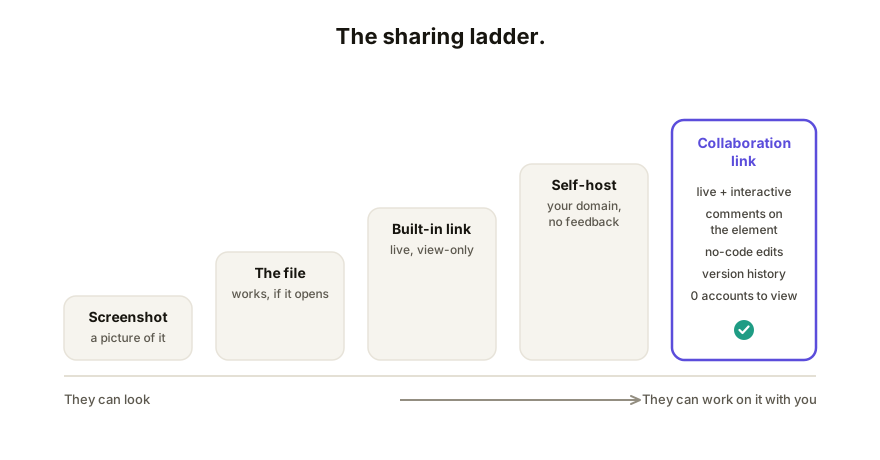
The comparison, up front
| Opens for anyone | Interactive | Feedback on the work | Others can edit | Version history | Your own domain | |
|---|---|---|---|---|---|---|
| Screenshot | Yes | No | No | No | No | n/a |
| Send the file | Unreliable | Yes, if it opens | No | No | No | n/a |
| Built-in share link | Mostly | Yes | No | No | No | No |
| Self-hosting | Yes | Yes | No | No | Manual | Yes |
| Collaboration link | Yes | Yes | Yes, pinned to elements | Yes, controlled | Yes | Yes (paid tiers) |
Now the honest case for and against each.
1. The screenshot
Zero setup, works everywhere, and for "does this direction look right?" it's genuinely fine. But the thing your AI built is interactive; a screenshot amputates that. Nobody can click the filters, test the calculator, or see the hover states. If you find yourself sending four screenshots to cover one page's states, the page wanted to be a link.
2. Sending the file
AI tools hand you HTML, and it's tempting to just forward it. Sometimes that works. Often it doesn't: mail clients flag HTML attachments, phones open them as code, and separately-referenced images arrive broken. We wrote up why attachments fail and what to do instead. Reserve this for one technical recipient who asked for the file.
3. The tool's built-in share link
Claude publishes artifacts, ChatGPT shares conversations with canvases, Gemini shares from its canvas (how each works). This is the right default for a quick look: no setup, reasonably reliable.
Its ceiling is structural, though. These links are view-only, they live on the AI vendor's domain, and there's no channel for response: feedback arrives as chat messages you translate back into prompts yourself. One person glancing? Great. A client review cycle? You'll feel the ceiling in the first round.
4. Hosting it yourself
Export the HTML, put it on Netlify, Vercel, GitHub Pages, or Cloudflare Pages, and you get a proper URL, on your own domain if you configure one. Best for finished, public things: a portfolio piece, a published tool.
The costs: setup that non-developers rarely want, hand-re-uploading every revision, and still no feedback or collaboration; you've built distribution, not review. For work that's done, that's fine. Most shared AI apps aren't done; sharing is how they get done.
5. The collaboration link
Paste the HTML into a collaboration layer like Coedit and share the URL. What changes: viewers open it with no account, comments attach to the exact element they're about, people you allow can edit copy and styling without code, and every change (human or agent) lands in one version history. The link stays current as you republish, so there's never a stale copy circulating.
The honest trade-off: it's one more tool in your stack, and if literally all you need is public hosting of a finished page forever, a static host is simpler. The fit is everything between "first draft" and "done": which is where most AI-built work lives.
So what's actually best?
Match the option to what the recipient needs to do:
- React to a direction → screenshot.
- Look at the real thing once → built-in share link.
- Use a finished, public page → self-host it.
- Review, comment, edit, or iterate with you → collaboration link.
If you're unsure, notice where the feedback goes. When it flows as "they said change X" messages that you re-prompt into the AI by hand, the sharing method is costing you a round-trip per comment. That relay is the thing a collaboration link deletes.
How Coedit fits
Coedit is the collaboration-link option, kept deliberately narrow: it never generates apps, it makes the app you already have shareable, commentable, editable, and versioned. It's tool-agnostic by design (Claude, ChatGPT, Gemini, Lovable, v0, hand-written HTML all publish the same way), viewing and commenting are free with zero accounts, and paid plans add things like custom domains and invite-only links.
FAQ
Q: What's the best way to share an AI app with a client? A: A link they can open with no account and comment on directly. Clients won't install anything or sign up for your tools, and screenshot-plus-email reviews lose details. A collaboration link meets them where they are: a browser.
Q: Is the AI tool's built-in share link enough? A: For showing one person something once, yes. It stops being enough when you need feedback, edits from others, your own domain, or a link that doesn't go stale as you iterate.
Q: Do I have to host an AI-generated app to share it? A: You need it reachable on the web somehow, but that doesn't mean running hosting yourself. Built-in links and collaboration links both handle serving for you; self-hosting is only necessary when you want full infrastructure control.
Q: How do teams using different AI tools share in one place? A: Standardize on the output, not the generator. Everything these tools build is HTML underneath, so a tool-agnostic collaboration layer gives every app the same link format, review flow, and history regardless of source.