TL;DR
You don't need a developer or portal software. Brief an AI tool (Claude, ChatGPT, Gemini, Lovable, v0) with the sections your client asks about, get one self-contained HTML page back, and publish it through a collaboration layer to a live, private link. Same URL all engagement, updated in place, comments taken on the page.
Why one link beats fourteen email threads
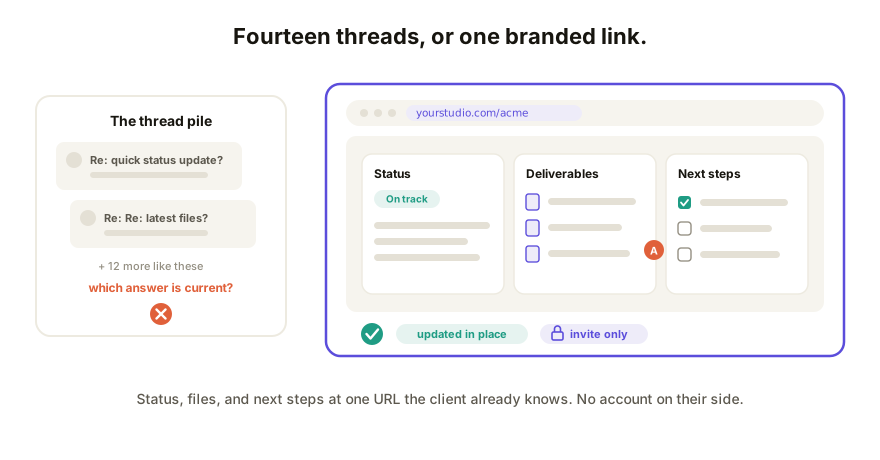
Every "quick status update?" email is a small tax: the client pays it by asking, you pay it by digging up the answer, and the project pays it when something gets lost between thread four and thread eleven. A portal flips that. One URL, bookmarked on the client's side, that always shows the current status, the deliverables so far, and what happens next. The client checks instead of asking. You update one page instead of writing the same paragraph three times a week. And when the engagement ends, the whole record sits in one place instead of an inbox.
The options people usually try (and what each costs)
- Portal SaaS. Tools built for this exist, and most price per client or per seat, which stings when you run six small engagements at once. You also get their template: your logo in the corner of someone else's product.
- A Notion page. Fast to make, but it's not branded, it looks like an internal doc because it is one, and "here's a link to my Notion" lands differently than a page on your own domain.
- A WordPress site. Full control, plus hosting, plugins, updates, and a login you'll forget. You wanted a status page, you got a maintenance contract.
The AI-built way, step by step
The page you want is a small AI-built app: one self-contained HTML file with your branding and your project's real data. Any current AI tool can draft it.
- List the sections. What does this client actually ask about? Usually: current status, deliverables with links, next steps with dates, and how to reach you.
- Brief your AI tool. In Claude, ChatGPT, Gemini, Lovable, or v0, ask for one self-contained HTML page with those sections, your studio name and colors, and paste in the real project details. Ask it to keep everything in a single file.
- Publish it through a collaboration layer. Paste the HTML in and you get a live URL where the page runs in the client's browser. No hosting to set up, and on a paid plan the link can sit on your own domain.
- Lock it down and send it. Turn on password or invite-only access, then send the client the one link. They open it in a click; no account on their side.
- Update it weekly, in place. Change copy and status directly on the live page, or rebuild sections in your AI tool and republish to the same URL.
Total build time is an afternoon for the first client and minutes for the second, because the second portal is the first one with different data.
Keeping it current, private, and useful
- Same link, all engagement. The portal updates in place, so "check the portal" stays true from kickoff to handoff. Every change lands in version history, so week three's page is still there when someone asks what was promised in week three.
- Private by default. Client work carries fees and unreleased material. Password protection or invite-only access means only the people you name can open it, and they still don't need an account.
- Feedback on the page itself. The client can comment directly on the live page, pinned to the exact deliverable or line they mean. That's a status update and a feedback channel in one URL.
How Coedit fits
Coedit is the delivery half of this. Your AI tool writes the portal; Coedit turns the HTML into a live link your client can open and comment on without ever making an account. Comments pin to specific elements, copy and styling stay editable on the live page, and every change lands in version history with rollback. Pro is $12 per editor per month and adds your own domain on the link, private and password sharing, and no Coedit badge, so the portal reads as yours from the URL down. Coedit never generates the page; it makes the one you built arrive and stay current. If portals are one deliverable among many for you, the freelancer's guide to AI-built client deliverables covers the rest of the workflow.
FAQ
Q: Can I really make a client portal without writing any code? A: Yes. An AI tool drafts the page as one self-contained HTML file from a plain-language brief, and a collaboration layer publishes it to a live link. You never touch the code unless you want to, and small copy edits happen directly on the live page.
Q: How do I keep a client portal private? A: Use password protection or invite-only access on the link, so only the people you name can open it. Your client still doesn't need an account to view or comment.
Q: What does this cost compared with portal software? A: Portal SaaS usually prices per client. Here the page itself costs nothing to make, Coedit's free plan covers 10 projects, and Pro is $12 per editor per month with unlimited projects, so six client portals cost the same as one.
Q: How do I update the portal without breaking the client's link? A: The link never changes. Edit text and styling in place, or republish a new version from your AI tool to the same URL. Version history records every change, with rollback if a week's update goes wrong.