TL;DR
Screenshots freeze a version that is already old, and email prose spends three sentences describing where the button is. Put the page itself on a live link and let the client comment on the element they mean. Every note pins to its spot, survives edits, and can be resolved or reopened, so nothing gets lost between rounds.
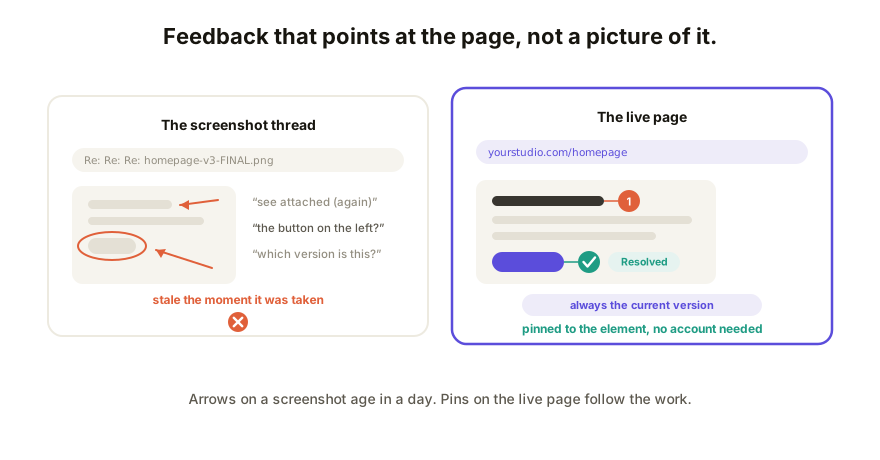
Why client feedback keeps arriving broken
You built the page (often with Claude, Lovable, v0, or whatever tool the project called for), the client has opinions, and now those opinions have to travel. The usual three channels each drop something on the way:
- The email essay. "In the section below the pricing part, the second line, could the wording be softer?" You spend the first ten minutes of every round decoding locations instead of acting on notes. The client is describing coordinates in prose because they have nothing to point at.
- The annotated screenshot. Red arrows, circles, "see attached." It feels precise, but a screenshot is a photo of a moment. You fix two things, the layout shifts, and every remaining arrow now points at the wrong pixels. The thread keeps arguing with a version that no longer exists.
- The live call. Great for tone, terrible for record. Someone takes notes, the notes say "make the top part pop more," and nobody can attach that to an element a week later. Half of it quietly evaporates.
The common failure is the same in all three: the feedback lives somewhere other than the work.
What a good feedback round looks like
Hold your process against three requirements:
- Comments pin to the exact element. The client clicks the actual button and types. No location prose, no arrows, no "the thing on the left." Comments on the live app itself remove the entire decoding step.
- Feedback lands on the current version. The link always shows the latest page, so nobody annotates history. When you push a fix mid-round, the next comment arrives on the fixed page.
- Threads resolve and reopen. Each note has a state. Done means resolved, not "I think I got that one." If the fix misses, the client reopens the same thread instead of starting a new email.
Meet all three and the feedback round stops being archaeology.
A comment is really a change request
Here's the part that changes the job: once a comment sits on the exact element, it stops being commentary and becomes a work item with an address.
Small requests (wording, a color, spacing, a heading) don't need to travel anywhere. You edit copy and style directly on the live page, resolve the thread, and the client sees the fix at the same link. For requests the client could honestly make themselves, hand them the edit instead of the wait.
Bigger requests (new section, changed logic, restructure) go back through whatever AI tool built the page. Regenerate, republish to the same link, resolve the thread. The client never gets a v2 URL, and version history keeps the record of what each round changed, with rollback if a round goes sideways.
Set it up, step by step
- Publish the page to a live link with a collaboration layer. If it started life as an artifact or canvas, get the HTML out and paste it in; the client should never see your AI tool's sign-in wall.
- Send the client one link with one instruction: "Click anything and leave a comment on it." No account on their side, no download, works on their phone.
- Watch the pins land. Each comment is attached to the element the client actually meant, on the version that is actually live.
- Work the list. Copy and style fixes happen right on the page; structural changes go through your AI tool and republish to the same URL.
- Resolve each thread as you go. The client reopens anything that isn't fixed to their eye, and the round has a visible finish line: zero open threads.
Run the round, don't let it drip
Feedback without a deadline arrives forever. Two habits keep a round short:
- Set a window. "Comments by Thursday, fixes by Monday" beats an open invitation. A live link makes the ask small enough that clients actually meet it.
- One consolidated round beats a drip. Ask the client to walk the whole page once and pin everything, rather than sending a thought per day. Ten pins on Tuesday is a work session; ten emails across two weeks is a haunting. Agencies running this at volume have a heavier-duty version of the same loop.
How Coedit fits
Coedit is the live link. Publish the page from whatever built it (Claude, ChatGPT, Gemini, Lovable, v0, or hand-written HTML), send one URL, and the client comments pinned to specific elements with zero signup. Pins survive your edits, threads resolve and reopen, and you change copy and style directly on the page while version history records each round. On Pro ($12 per editor per month) the link can be private or password-protected and live on your own domain. Coedit never generates or rewrites your work; it makes the review of that work land in the right place.
FAQ
Q: How do I get client feedback on a website without a screenshot thread? A: Publish the page to a live link that accepts comments in place. The client clicks the element they mean and types; the note pins there and stays attached as the page changes, so nobody decodes locations from prose or stale annotations.
Q: Does my client need an account to leave comments? A: No. Viewing and commenting on a Coedit link require no account at all. The client opens the URL and clicks; accounts stay on your side of the work.
Q: What happens to the comments when I update the page? A: Pins are attached to elements, not pixel positions, so they survive edits to the page around them. The link always serves the current version, and version history keeps each round on record with rollback if you need it.
Q: What about feedback that needs a real change, not a tweak? A: Treat the comment as the change request. Copy and style fixes happen directly on the live page. Anything structural goes back through the AI tool that built the page and republishes to the same link, then you resolve the thread.