TL;DR
An interactive deliverable is a small web page the client can operate: a proposal with scope toggles, a report with filters, a calculator running their numbers. It answers the client's actual questions in the page instead of scheduling them into a follow-up call, and since AI tools now build one from a plain-language prompt, the cost difference against a PDF has collapsed. What's left is delivery: send it as one live link on your domain, not an attachment, and take the feedback on the page.
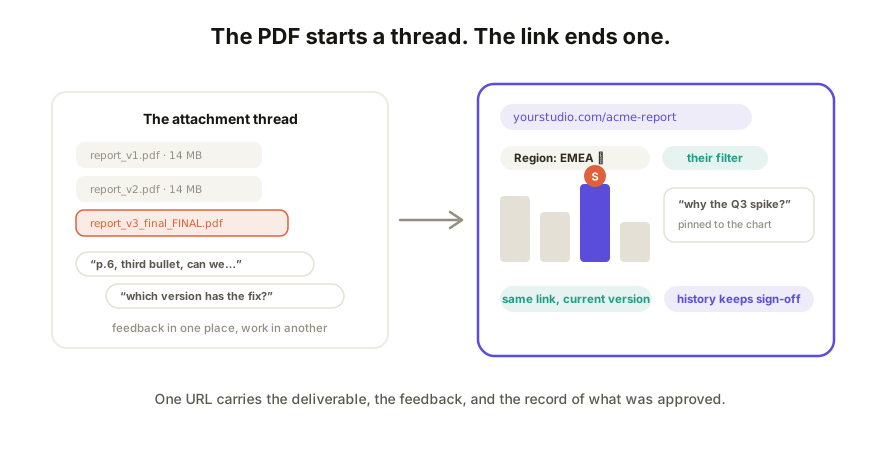
Where the PDF loses
Nothing is wrong with PDFs as records. They lose as deliverables, at the moment the client engages:
- One scenario, frozen. Your report shows the quarter you charted. The client's first question is about the segment you didn't. With a PDF, that's a revision cycle; with filters, it's a click.
- Feedback happens somewhere else. Questions about page 6 arrive in email, detached from page 6. You spend the next morning reconciling a thread against a document.
- Revisions multiply files.
report_v3_final_FINAL.pdfis a workflow everyone recognizes and nobody defends. Which one did the client approve? Hope your inbox knows. - It undersells the work. You used the best tools available to make the thing; the client receives the same static rectangle they got in 2015.
What to send instead, by deliverable
The pattern is the same each time: the client operates the page, in your framing, and the page absorbs the questions.
| Deliverable | The interactive version | The payoff |
|---|---|---|
| Proposal | Scope toggles, live pricing, their inputs | The client negotiates with the page, not with silence |
| Report | Filters, expandable sections, charts they can probe | "Can we see it by region?" is a click, not a revision |
| Calculator | ROI or quote logic with their numbers | Persuasion with their inputs, not your example client's |
| Portal | Status, files, and next steps at one URL | One place to look, updated in place all engagement long |
Making one is now a prompt, not a project
Give your AI tool (Claude, ChatGPT, Gemini, Lovable, v0, whichever you use) the content you already own: the scope, the numbers, the pricing logic, your palette. Ask for an interactive page and iterate until it behaves, then ask for one self-contained HTML file. The words and the thinking were always the real work; the interactivity used to cost a developer, and now it doesn't. Keep any pricing logic simple enough to verify by hand. You'll be quoting those numbers.
Sending it is the part that breaks
An interactive deliverable emailed as a file or parked behind an AI vendor's sign-in wall dies exactly like the prototype in the client-sharing guide. Delivery checklist: one live link that opens with no account; your domain on it for anything you'd put a logo on; password or invite-only access when it carries pricing; comments on the page so feedback lands where the work is; and updates in place, so the same link always shows the current version while history keeps what they saw before.
And keep making PDFs, at the end: freeze a snapshot at sign-off for the file. The live page carries the decision; the PDF commemorates it.
How Coedit fits
Coedit is the delivery half. Paste the deliverable's HTML from whatever AI built it, get one live link a client opens with zero signup, and take their comments pinned to the exact element they mean. Fix copy and styling right on the page, republish deeper changes to the same link, and let one version history answer "which version did they approve?" On Pro it all happens on your domain, badge-free, behind access you control per client. Coedit never writes the deliverable; it makes the one you wrote land like it should.
FAQ
Q: What is an interactive deliverable? A: A client deliverable built as a small web page the client can operate: toggles, filters, inputs, and live calculations instead of frozen pages. Proposals, reports, calculators, and client portals are the common cases.
Q: When is a PDF still the right call? A: At signature and for the archive. Freeze a PDF snapshot of the approved state for the record, and let the live page do the persuading and the feedback before that. Compliance contexts that require documents stay documents.
Q: Do clients actually use the interactive version? A: The forwarding is the tell: a link travels to stakeholders an attachment never reaches, and each one answers their own first question in it. You hear the difference in the follow-up call, when they arrive having already explored the options.
Q: Won't my client find a web link less professional than a PDF? A: The opposite, if delivery is right: a page at yourstudio.com that opens in one click reads as more finished than an attachment, not less. What reads unprofessional is a broken file or an AI vendor's sign-in wall, which is why the sending part matters as much as the making part.